





In today’s fast-paced digital world, choosing the right smartphone can be a daunting task — especially with so many technical terms flying around. One of the most crucial yet often misunderstood aspects of any phone is RAM and ROM.
If you’ve ever asked, “What do RAM and ROM mean?” or “How much RAM do I really need?” — this blog post will break it all down for you, Ukamart-style — simple, clear, and straight to the point.
🧠 What Is RAM in a Phone?
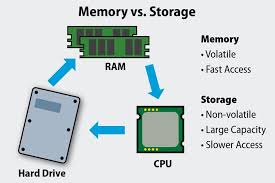
RAM stands for Random Access Memory. Think of RAM as your phone’s short-term memory. It helps your phone run smoothly by temporarily storing data your device is actively using — like apps you’ve opened, tabs in your browser, or processes running in the background.
📌 Why RAM Matters:
- The more RAM your phone has, the faster and smoother it will be.
- It helps in multitasking — switching between apps without lag.
- Great RAM ensures better gaming, streaming, and browsing experiences.
📱 Common RAM Sizes Today:
- 2GB/3GB – Basic phones (minimal multitasking, suitable for calls, social media, light apps)
- 4GB/6GB – Mid-range phones (can handle most apps and light gaming well)
- 8GB+ – High-end phones (for gamers, content creators, heavy multitaskers)
💾 What Is ROM in a Phone?

ROM stands for Read-Only Memory, but in the smartphone world, it’s commonly referred to as your phone’s internal storage — where your photos, apps, videos, and system files are kept.
📌 Why ROM Matters:
- More ROM = More space for apps, videos, and files.
- A larger ROM ensures your phone doesn’t slow down or freeze due to lack of storage.
- If you like downloading movies, shooting videos, or installing large apps, ROM size is critical.
📱 Common ROM Sizes Today:
- 32GB/64GB – Basic to moderate use (WhatsApp, social media, light media storage)
- 128GB/256GB – Ideal for heavy users (videos, photos, games, and productivity apps)
- 512GB/1TB – Found in premium devices (for professionals, creators, or those who want a laptop-like experience)
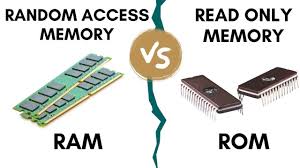
⚖️ RAM vs ROM: Quick Comparison Table
| Feature | RAM | ROM |
|---|---|---|
| Full Name | Random Access Memory | Read-Only Memory |
| Function | Temporary memory for running tasks | Permanent storage for files & apps |
| Affects | Speed, multitasking, performance | Storage space & app capacity |
| Upgradable? | Usually no | Sometimes via SD card (ROM only) |
| Size Range | 2GB to 16GB | 32GB to 1TB |
🛒 How to Choose the Right RAM & ROM When Buying a Phone
Here’s a simple guide to help you pick based on your needs:
💼 For Basic Users:
- RAM: 3GB–4GB
- ROM: 32GB–64GB
- Use: Calls, WhatsApp, Facebook, light browsing.
🧑🎓 For Students or Workers:
- RAM: 4GB–6GB
- ROM: 64GB–128GB
- Use: Google Classroom, Zoom, PDFs, social media, light editing.
🎮 For Gamers or Creators:
- RAM: 6GB–12GB
- ROM: 128GB–512GB
- Use: Gaming, video editing, photography, multitasking.
💡 Pro Tip from Ukamart
When buying your next phone, don’t just look at camera specs or screen size. Make sure the RAM is enough to keep up with your activities and the ROM gives you breathing space to store your life digitally. It’s better to go for more storage than you think you need, especially with app sizes and media files growing fast.
🔚 Conclusion
Now that you know what RAM and ROM mean, you’re one step closer to becoming a smart phone shopper. Whether you’re buying a Tecno, Infinix, Samsung, Xiaomi, or iPhone, understanding these two specs will help you make a better, long-lasting choice.
At Ukamart, we’re always ready to help you choose the right phone — based on your budget and your lifestyle. Visit our stores or shop online at www.ukamart.com to get the best deals on phones and gadgets in Nigeria!


Oh really. Now i know the difference, thanks for this update
you are welcome Mr Bright Inwon. We are really glad for yor feedback. Pls stay tune for more informative posts from us.